

Issues observed :
I came across a new issue recently in which I could not direct RDP to a freshly installed Windows Server 2019 Standard edtion and face this funny error “Your Credentials did not work ” from a existing active directory domain ( not matter which version) . I was sure the credential was correct since could easily login via console without any error .This turns to be an issue with below policies which prevents any Windows machine in AD unable to RDP to standalone Windows server 2019.
Workaround :
Solution is to perform the below to let yourself in temporarly :
- Here is your friend “gpedit.msc“
- Dig in to the following path : “Computer Configuration\Administrative Templates\System\Credentials Delegation”

1 Allow delegating default credentials
2 Allow delegating saved credentials
3 Computer Configuration > Administrative Templates > System > Credentials Delegation
4 Allow delegating saved credentials with NTLM-only server authentication
Do change each of the above policy per below example :
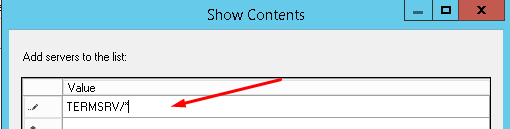
Last but not least edit the following registry key “Computer\HKEY_LOCAL_MACHINE\SYSTEM\CurrentControlSet\Control\Lsa\LMCompatibilityLevelLevel” and set the value to “1” . note the key type is “REG_DWORD“. Having done the above you you will be able to RDP to server . This solution should be done as temportarlity fix since you can RDP to the server by rolling back the changes once the server joined to the Active Directory domain.
Cheers 🙂